How to add an AI chatbot to your Instagram or TikTok bio
Put an AI chat link in your Instagram or TikTok bio, Stories and DM replies, so customers get prices, hours and bookings any time.
Short answer: Copy your assistant's chat link and add it to your profile under Edit profile > Links. Instagram lets you add up to 5 links. On TikTok, you can add a website link once you have at least 1,000 followers or a Verified Business Account. On Instagram, add the same link to a Story with a link sticker, save that Story as a Highlight, and use Instagram's own message tools (frequently asked questions, saved replies and Meta Business Suite automations) to point people who DM you to the chat. The chat answers prices, hours, delivery and "how do I book" on its own, day and night.
One thing to be clear about: the chatbot doesn't reply inside your Instagram or TikTok messages. It lives on its own chat page. Your profile is where people find the link.
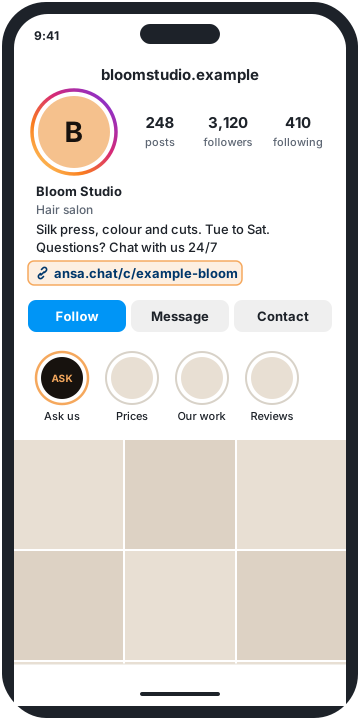
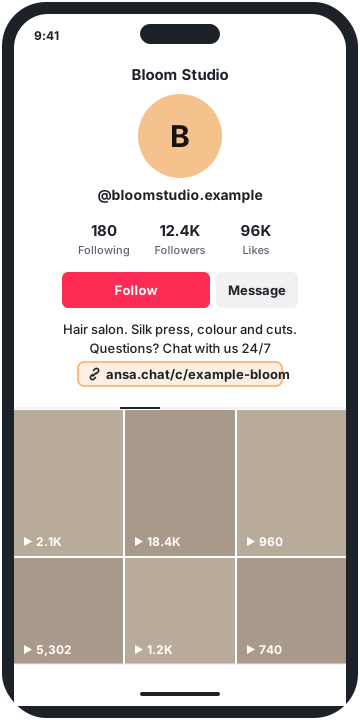
This guide is for salons, studios, bakeries, boutiques, tour operators and other small businesses whose bio already links to a website, a phone number or a booking page. The pictures show Bloom Studio, a made-up hair salon.
Instagram and TikTok details in this guide were checked on their official help pages on 3 November 2026. Menus change, so check the sources if something looks different.
Why put a chatbot in your bio
Most DMs to a small business are the same few questions. How much is it? Are you open Sunday? Do you deliver to my area? How do I book? Each one takes a minute to answer, and they arrive while you're working.
A link to your website doesn't stop them. People don't want to dig through pages on their phone. A chat link lets them type the question and get the answer straight away, from your own prices and policies.
What you need
- An Ansa assistant that knows your business. Add your website, upload your price list or menu, and add exact answers as Q&A pairs. See Set up in 10 minutes.
- Your chat link. Open Deploy, turn on Publish, then click Copy link under No website? Share a link. It looks like
https://ansa.chat/c/YOUR-ASSISTANT-ID. See Share your chat link. - For the Instagram DM tools in step 5: an Instagram business or creator account. Instagram calls these professional accounts.
- For a TikTok link: at least 1,000 followers, or a Verified Business Account.
You don't need a website. The chat link works on its own.
Step 1: Add the chat link to your Instagram bio
In the Instagram app:
- Go to your profile and tap Edit profile.
- Tap Links, then Add external link.
- Paste your chat link and tap Done.
You can add up to 5 links, so the chat can sit next to your website and booking page. To put it first, open Links, tap Options, then Reorder links.
Mention it in your bio text too, in a few words: "Questions? Chat with us 24/7."
Step 2: Add it to your TikTok bio
TikTok lets you add a website link to your profile if you have at least 1,000 followers, or a Verified Business Account. In the TikTok app:
- Tap Profile, then Edit profile.
- Next to Links, tap Add.
- Follow the steps to add your chat link.
When someone taps it, the chat opens in TikTok's own browser. TikTok recommends direct links, because it limits browsing through chains of links in that browser and may ask people to open the page in their phone's browser instead. A chat link is direct: one tap and they can ask.
Using a link-in-bio page?
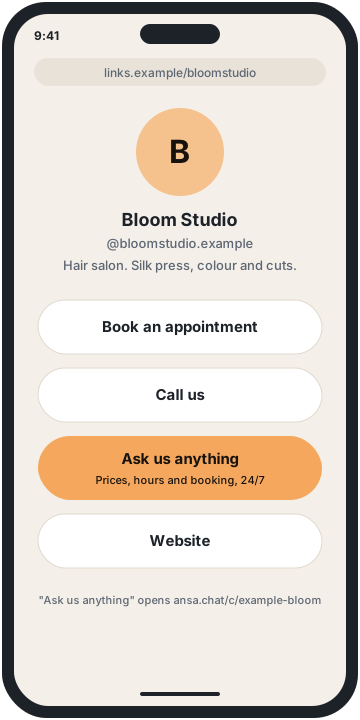
If your bio already points to a page of buttons, add the chat as one of them, near the top, with a label that says what it does: "Ask us anything" works better than "Chat". On TikTok, linking straight to the chat saves people a step.
Step 3: Add it to an Instagram Story
Stories reach people who already follow you. Add a link sticker with your chat link to a Story, with a short line like "Prices, hours and bookings: ask here". People who tap the sticker go straight to the chat.
Step 4: Save it as a Highlight
Stories disappear after a day. Highlights stay on your profile until you remove them.
- Go to your profile and tap New (or Story highlight).
- Choose the Story with your chat link sticker and tap Next.
- Name it something like "Ask us" or "FAQ", pick a cover and tap Add.
Step 5: Point your Instagram DMs to the chat
This is the step that cuts DM overload. Instagram can't hand a DM to Ansa, but its own tools can send people to your chat link, so the next question goes there instead.
Frequently asked questions in chats
On business and creator accounts, you can set up to four questions that people see when they start a message to you. Each can have an automated response.
- Tap Messages, then the menu, then Tools.
- Tap Frequently asked questions and turn on Show Questions.
- Tap Add Question. Use your most common ones: "How much is a cut and colour?", "Do you deliver?", "How do I book?".
- In Automated Response, give a short answer and add your chat link for anything else, for example: "Prices start from the menu in our chat. Ask anything here, any time: [your link]".
Instagram notes that a message sent by tapping one of these questions goes to your Requests, and you accept it to reply yourself.
Saved replies
Saved replies let you send a message you've written once with a short keyboard shortcut. Hold a message you've sent, tap More, then Save, and pick a shortcut like /ask. Make one that says: "Thanks for your message. For prices, hours and bookings, our assistant answers straight away: [your link]. We'll reply here too."
This keeps your replies quick even when you answer by hand.
Automations in Meta Business Suite
If your Instagram business account is connected to Meta Business Suite, its Inbox has Automations. The templates include:
- Instant reply (called Auto reply in the desktop list): a greeting when someone messages you for the first time.
- Away message: a reply when you're not available.
- Hours, Location and Contact information: replies to those questions.
- Custom keywords (desktop only): a reply when a message contains words you choose, like "price" or "book".
Meta says keyword replies can include links. Add your chat link to them. For the other replies, add the link and send yourself a test message from another account to check how it looks.
What your customers see
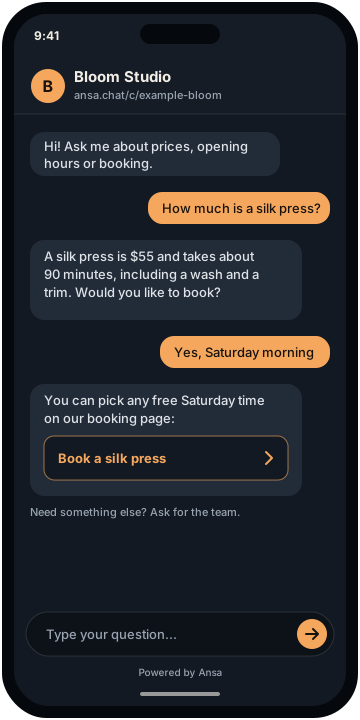
When someone taps your link, a chat page opens in their browser with your assistant's name, colours and welcome message, plus up to 4 suggested questions they can tap. Nothing to download and no account to make. They type a question and get an answer in a few seconds, in their own language.
You set the look in Appearance. See Customise your assistant.
What it answers, and when it hands off
It answers from your information: prices, opening hours, services, delivery areas, deposits, cancellation rules and anything else on your website, documents and Q&A pairs. If the answer isn't there, it says so instead of guessing, and saves the question under Unanswered questions so you can add the answer.
It takes bookings. It shares your booking link on every plan. On Pro and Business, it can offer real free times from Google Calendar or Calendly. See Take bookings in the chat.
It hands off to you. For a complaint, a custom cake or a group booking, on Starter, Pro and Business it takes the customer's email (and phone number, if you like) and emails you their request with a summary of the chat. You reply from your own inbox. See When Ansa can't help.
See what people ask
Chats from your link appear in Conversations labelled Chat link. The label doesn't say where the link was tapped, so if you share it in several places, you won't see which one a chat came from.
Read the first week of chats. They show you which questions your followers really have, and which answers to add or sharpen.
What it costs
Each reply uses one answer from your plan. The chat link is included on every plan, including Free. You're never charged more than your plan.
- Free ($0): 20 answers a month, 1 MB of knowledge, up to 20 website pages per read, 5 documents, just you, 1 assistant.
- Starter ($25 a month): 500 answers a month, 5 MB of knowledge, up to 100 website pages per read, 20 documents, 3 team seats, 1 assistant.
- Pro ($89 a month): 2,000 answers a month, 20 MB of knowledge, up to 500 website pages per read, 50 documents, 10 team seats, 3 assistants, and you can remove “Powered by Ansa”.
- Business ($199 a month): 5,000 answers a month, 50 MB of knowledge, up to 1,000 website pages per read, 200 documents, 25 team seats, 10 assistants, and you can remove “Powered by Ansa”.
See Pricing.
FAQ
Can an AI chatbot reply to my Instagram DMs?
Ansa can't. It doesn't connect to Instagram or TikTok messages. It answers at its own chat link, which you share in your bio, Stories and DM replies. Some third-party tools do reply inside Instagram DMs; see How to handle too many Instagram DMs.
How many links can I have in my Instagram bio?
Up to 5, at the time of writing. Add them under Edit profile > Links.
How many followers do I need for a TikTok bio link?
At the time of writing, TikTok lets you add a website link with at least 1,000 followers, or with a Verified Business Account.
Do I need an Instagram business account?
Not to add links to your bio. You need a business or creator account for frequently asked questions and saved replies in Instagram chats, and an Instagram business account connected to Meta Business Suite for its automations.
Do I need a website?
No. The chat link works on its own. Ansa can learn from documents you upload and Q&A pairs you write.
Can it answer on WhatsApp as well?
Yes, on Starter, Pro and Business, Ansa replies on your own WhatsApp Business number from the same knowledge. See Connect your WhatsApp number.
Related reading
- How to handle too many Instagram DMs as a small business
- How an AI assistant can take bookings for your salon or studio
- Setting up AI customer support on WhatsApp
Want to try it? Start free, no card needed.
Sources
Instagram, Meta and TikTok details were checked on 3 November 2026 and may have changed since.
- Up to 5 links, adding and reordering them: Add a website to your Instagram profile (checked on 2026-11-03)
- TikTok profile links (1,000 followers or a Verified Business Account, steps, in-app browser): Adding a website link to your profile (checked on 2026-11-03)
- Link stickers in Stories: About link sticker on Instagram Stories (checked on 2026-11-03)
- Highlights: Add a story to your Story Highlights (checked on 2026-11-03)
- Frequently asked questions in chats: Frequently Asked Questions on Instagram Chats (checked on 2026-11-03)
- Saved replies: About professional features in Instagram Direct professional inbox (checked on 2026-11-03)
- Meta Business Suite automations: About Inbox automations and Set up Inbox automations on desktop (checked on 2026-11-03)
- Ansa plans and limits: Plans and limits and Pricing